How to Run a TikTok Giveaway Wheel Fairly
TikTok's fast-paced, highly visual feed makes it the premier platform for viral giveaways. When you host a live or recorded giveaway using a dynamic digital spinning wheel, the visual suspense dramatically boosts watch time, comment velocity, and follower loyalty.
1. Why TikTok Lives are Perfect for Wheels
TikTok's algorithm prioritizes broadcasts that generate continuous retention and chat engagement. When you host a live giveaway using a visual tool like swheel, viewers stick around for the entire duration of the spin. This high retention rate signals to the algorithm that your stream is compelling, triggering recommendations across the For You Page (FYP).
2. Setting Up Your Broadcast for Vertical Video
To film cleanly for 9:16 vertical viewports:
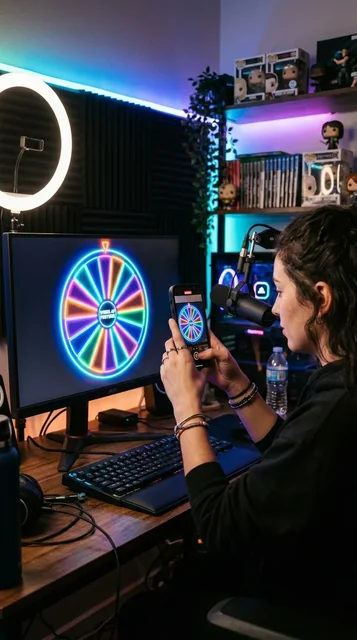
- Dual-Device Method: Point your camera phone at a tablet or laptop running swheel.us in full-screen dark mode. The high-contrast neon segments pop on mobile displays.
- OBS Virtual Camera: Crop your browser window to a 1080x1920 canvas, centering the wheel in the middle third with chat overlays below.
- Audio Setup: Keep the mechanical wheel clicker and confetti applause sound effects enabled so viewers hear the satisfying tension build-up.
3. Driving Engagement Before the Spin
Never spin right away. Build community anticipation:
- Announce that every viewer who comments a specific keyword (e.g. #SWHEEL) during the next 5 minutes gets their handle added to the wheel.
- Paste entries live into the giveaway picker so viewers watch their names appear in real time.
- Set a collective milestone: "We spin the moment the stream reaches 15,000 likes!"
4. Post-Giveaway Content Flywheel
After the wheel lands on a winner, the live stream is only half the battle. Immediately clip the 15-second climax showing the wheel slowing down, the pointer settling, and the winner banner exploding in confetti. Post this highlight reel to your main profile and Instagram Stories. Pin the post to your profile as definitive proof of legitimacy for future sponsors.
What is the best way to film a spin wheel for TikTok?
Film the screen directly with your phone in a vertical (9:16) format, or use OBS to record a vertical browser window. Seeing the physical screen often builds more trust than a pure screen recording.
How do I handle hundreds of comments?
Use our free comment picker to extract all unique usernames from your video, then paste them directly into the wheel.
Should I do the giveaway live?
Live draws are fantastic for engagement and transparency. Going live on TikTok while spinning the wheel practically guarantees viewers will stay till the end to see if they won.
Can I get banned on TikTok for hosting giveaways?
As long as you follow TikTok Community Guidelines and local laws regarding sweepstakes, giveaways are permitted. Avoid asking users to spam comments, and ensure you actually deliver the promised prize.